On demand routing and operations
On-demand operations in the Vehicle Routing Problem (VRP) refer to scenarios where customer requests (orders) are not known in advance but rather arise dynamically in real-time. This contrasts with traditional VRP models where all orders are typically assumed to be known beforehand.
While this use case centers around passenger travel, which is the most typical use case for on-demand services, it is also applicable to live order management in other industries, such as logistics.
Key Characteristics of On-Demand VRP:
- Dynamic Requests: Customers place orders with varying delivery locations and requirements throughout the operational period.
- Real-time Decision Making: The system must react to new incoming orders and adjust vehicle routes dynamically.
- Uncertainty: The future demand is unknown, making planning and optimization more complex.
On-demand operations significantly increase the complexity of the VRP solution compared to static VRPs.
- Continuous Re-optimization: As new orders arrive, the existing routes need to be re-optimized to incorporate the new requests efficiently. This requires frequent re-planning and can be computationally intensive.
- Real-time Response: The system needs to respond quickly to new orders to provide timely service to customers. This necessitates efficient algorithms and potentially real-time communication with vehicles.
- Uncertainty Management: Dealing with unknown future demand requires incorporating uncertainty into the planning process. This might involve using probabilistic models or robust optimization techniques to account for potential variations in demand.
- Dynamic Constraints: Time windows and other constraints might also be dynamic, changing as new orders come in. This adds another layer of complexity to the optimization problem.
Challenges and Considerations:
- Algorithm Efficiency: Algorithms for on-demand VRP need to be efficient enough to handle real-time updates and re-optimization.
- Information Management: The system needs to effectively manage information about incoming orders, vehicle locations, and changing constraints.
- Communication: Real-time communication between the central system and the vehicles is crucial for dynamic routing.
- Customer Service: Balancing efficiency with customer service is essential. The system needs to provide reasonable delivery time estimates and manage customer expectations in the face of dynamic changes.
Examples of On-Demand VRP:
- Courier Services: Companies like FedEx or UPS deal with on-demand requests for package pickups and deliveries.
- Ride-Sharing Services: Uber and Lyft operate on a purely on-demand basis, matching riders with available drivers in real-time.
- Food Delivery Services: Services like DoorDash or Grubhub handle orders that come in dynamically from customers.
SWAT APIs support operations on-demand, making such workflows applicable to both logistics and people transport scenarios.
Service quality parameters
Quality of on demand services can be configured to support various types of operations, including:
- "Taxi" model riding (one trip per vehicle)
- On demand pooling
- Support for walking for the passengers for a pickup at a predefined location
The quality of service is determined by the passengers' waiting time, trip duration, and cost of the trip.
SWAT model supports the following cost function with the objective of it's minimization:
- Optimization goals:
- Optimize total time (cost function is set in seconds and respects all configured time-based parameters)
- Optimize total distance (cost function is set in meters and respects all configured distance-based parameters)
- Passenger optimization (removes all vehicle related costs)
- Vehicle related costs:
- Vehicle trips (sum of duration of all vehicle trips)
- Vehicle cost (cost of using the vehicle)
- Passenger related costs:
- Passenger trips (sum of durations of all passenger trips)
- Passenger walking (additional cost allowing passengers to walk to\from the pickup\drop off location)
- Penalties:
- Some constraints can be soft, there is penalty for breaking them
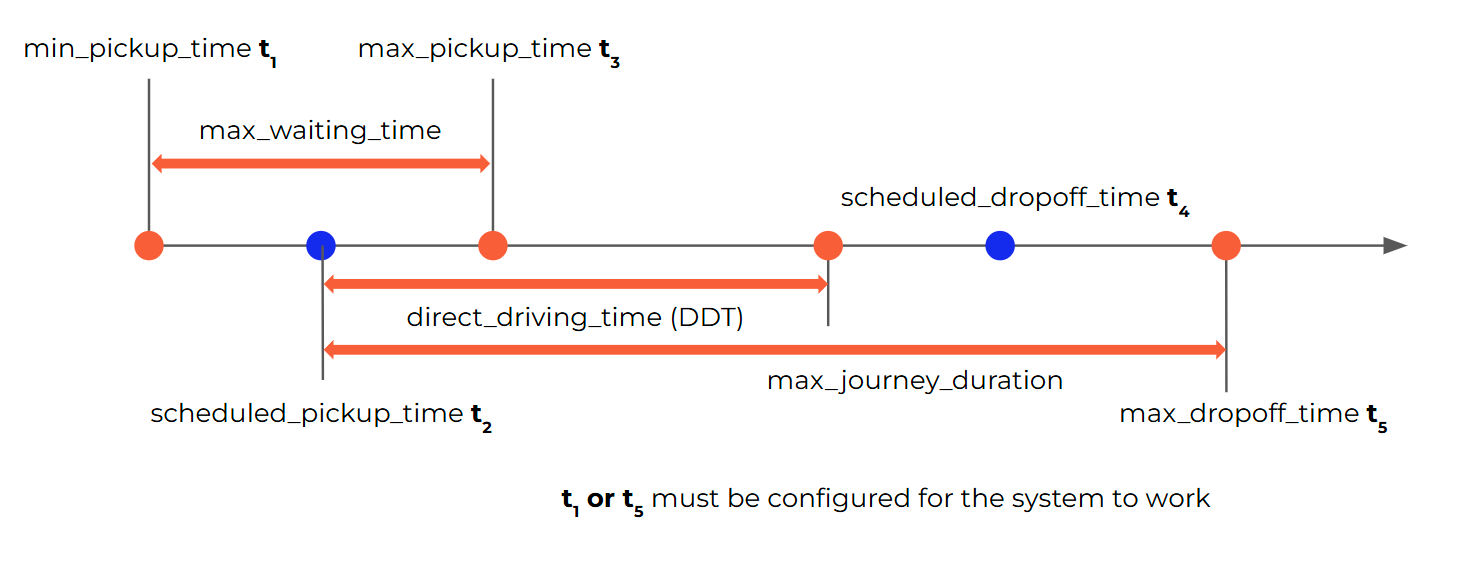
On of the key parameters for service quality is maximum waiting time for a passenger for a pickup. This time window is controlled by acceptable_waiting_time parameter.
Another parameter that controls the ability to pool passengers and determines service quality is the maximum journey duration for a passenger. Several methods are supported to calculate the cost related to journey duration, including:
| Value | Maximum journey duration |
|---|---|
| constant | max_additional_journey_time |
| routing | DDT + max(max_additional_journey_time, DDT * max_additional_journey_time_percent) |
| routing_max_cap | min(absolute_max_trip_duration, DDT + max(max_additional_journey_time, DDT * max_additional_journey_time_percent) |
| routing_min | DDT + min(max_additional_journey_time, DDT * max_additional_journey_time_percent) |
| routing_min_cap | min(absolute_max_trip_duration, DDT + min(max_additional_journey_time, DDT * max_additional_journey_time_percent) |
| different | max_dropoff_time - min_pickup_time |
The calculation mode is controlled by the simulation.journey_duration_source parameter.
Booking lead time and arrive-by windows
People transport bookings are either depart-at (the passenger gives a departure time) or arrive-by (the passenger gives an arrival time). These simulation parameters (in seconds) control how soon a booking may be requested and how the arrive-by drop-off window is built:
| Parameter | Default | Effect |
|---|---|---|
min_lead_time_depart_at | 0 | A depart-at booking must request a departure at least this far from now. |
min_lead_time_arrive_by | 7200 | An arrive-by booking must request an arrival at least this far from now. |
arrive_by_traffic_buffer_sec | 0 | Subtracted from the requested arrival time to get the latest drop-off time (max_dropoff_time), as a margin for traffic. |
acceptable_early_dropoff_time | null | How long before max_dropoff_time the drop-off window opens. When null, acceptable_waiting_time is used. |
The lead-time check applies to bookings made in the passenger app and to bookings created by an operator through POST /api/v2/microservices/bookings. A booking that is too soon is rejected with a 400 error. Because of the 2-hour default for min_lead_time_arrive_by, set it to 0 if your service accepts arrive-by bookings at short notice.
Example: arrive by 09:00 with arrive_by_traffic_buffer_sec: 300 and acceptable_early_dropoff_time: 900 gives a drop-off window of 08:40 – 08:55. The passenger's original 09:00 is kept on the booking as requested_target_time.
Insertion of a new booking
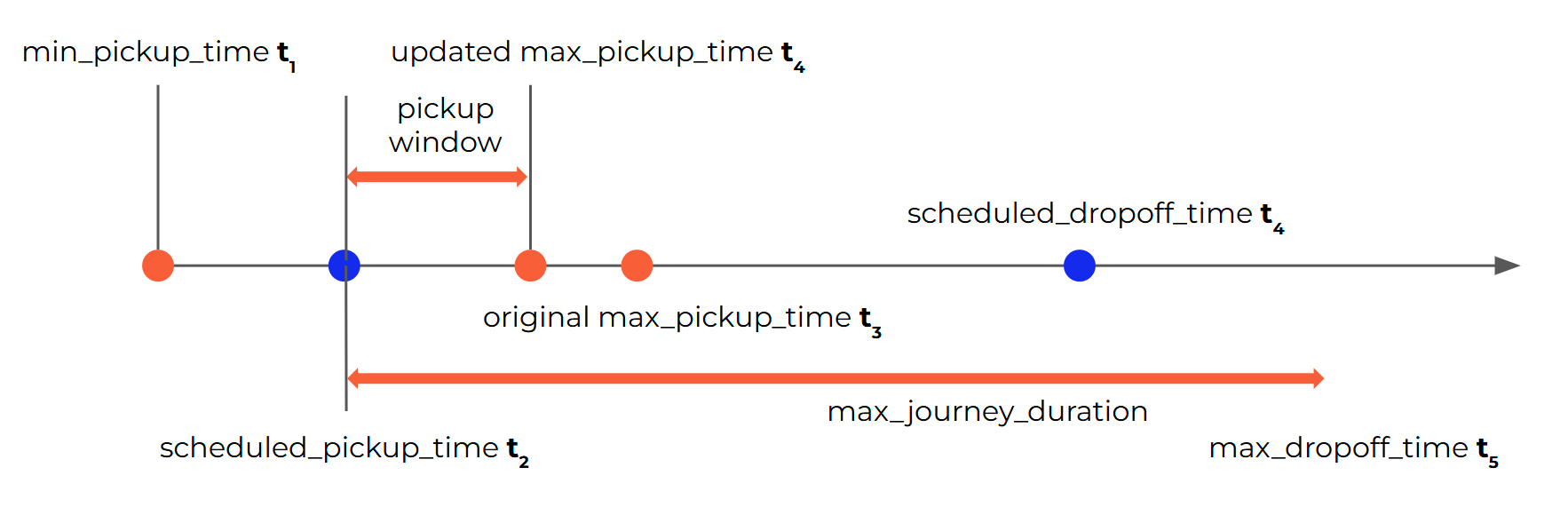
New bookings can be added to the same vehicle only if the constraints (pickup and dropoff windows) are not violated for the new and existing bookings on that vehicle. For successful insertion, any time window or other types of constraints must be met. Supporting flexible time windows allow for adjusting initial plan for the vehicle(s) without breaking the constraints.
Pinning time windows on assignment
Continuous re-optimization is free to move an already-assigned booking anywhere inside its original time window. Where a pickup time has already been promised to a customer or a driver, that drift is undesirable.
Two optional parameters narrow a booking's time window at the moment it is assigned to a vehicle, so that later optimization rounds can only move it within a small band around the planned time.
System configuration (seconds, set on simulation.data):
{
  "shrink_time_delta": 300,
  "reverse_shrink_time_delta": 120
}
| Parameter | Effect |
|---|---|
shrink_time_delta | How much later than the planned time the stop may still be served |
reverse_shrink_time_delta | How much earlier than the planned time the stop may be served |
Either parameter can be used on its own. Leaving both unset (or null, the default) disables the feature.
How it works — for depart-at bookings, which is the default transfer type:
pickup.open_time_ts  = max(scheduled_ts - reverse_shrink_time_delta, pickup.open_time_ts)
pickup.close_time_ts = min(scheduled_ts + shrink_time_delta,         pickup.close_time_ts)
scheduled_ts is the time the optimizer has just planned for the stop. The min/max clamp means a window is only ever narrowed against the booking's original window — these parameters can never widen a window or make an infeasible plan feasible.
The narrowing is applied only to stops that are not yet assigned to a vehicle, so it takes effect once, when a booking is first committed to a route. The narrowed window is persisted on the node and is what every subsequent optimization round reads.
Example — an order with a 09:00–11:00 pickup window, planned for pickup at 09:40, with the configuration above:
| Before assignment | After assignment | |
|---|---|---|
| Pickup window | 09:00 – 11:00 | 09:38 – 09:45 |
Later rounds may still reassign the booking to another vehicle, but can no longer move its pickup outside 09:38–09:45.
For depart-at bookings the drop-off window is not narrowed — it is derived from the pickup: the drop-off opens when the pickup opens, and closes max_trip_duration later.
In logistics, where max_trip_duration is the full span max_dropoff_time - min_pickup_time, this discards the order's own min_dropoff_time, and every second by which reverse_shrink_time_delta moves the pickup's opening time also moves the drop-off's closing time past max_dropoff_time. Do not use these parameters on operations where the delivery window has to be respected.
For arrive-by bookings the logic is mirrored: the drop-off window is pinned around its planned time, and the pickup window is derived from it.
People transport
In passenger operations the parameters pin the time the passenger has been told. Which stop is pinned depends on the booking's transfer type. max_trip_duration is the passenger's maximum journey duration (see journey_duration_source above).
Depart-at bookings (the passenger asks to be picked up from a time) — the pickup is pinned:
| Field | shrink_time_delta only | reverse_shrink_time_delta set (with or without shrink_time_delta) |
|---|---|---|
| Pickup opens | unchanged | max(scheduled_ts - reverse_shrink_time_delta, open) |
| Pickup closes | min(scheduled_ts + shrink_time_delta, close) | same as left if shrink_time_delta is set, otherwise unchanged |
| Drop-off opens | = pickup opens | = pickup opens |
| Drop-off closes | pickup opens + max_trip_duration | algo_type: dynamic: pickup opens + max_trip_durationalgo_type: static: unchanged |
| Drop-off closes (dynamic deadline) | pickup closes + max_trip_duration | pickup closes + max_trip_duration |
Example — pickup requested from 08:00 with a 20-minute acceptable_waiting_time (window 08:00–08:20), planned at 08:12, max_trip_duration 30 min, shrink_time_delta: 180, reverse_shrink_time_delta: 120:
| Before assignment | After assignment | |
|---|---|---|
| Pickup window | 08:00 – 08:20 | 08:10 – 08:15 |
| Drop-off opens | 08:10 | |
| Drop-off closes (dynamic deadline) | 08:45 |
The passenger told "your bus arrives at about 08:12" will be picked up between 08:10 and 08:15, whatever later bookings are pooled into the vehicle.
Arrive-by bookings (the passenger must arrive by a time) — the drop-off is pinned:
| Field | shrink_time_delta only | reverse_shrink_time_delta set (with or without shrink_time_delta) |
|---|---|---|
| Drop-off opens | max(scheduled_ts - shrink_time_delta, open) | max(scheduled_ts - reverse_shrink_time_delta, open) |
| Drop-off closes | min(scheduled_ts + shrink_time_delta, close) | same as left if shrink_time_delta is set, otherwise unchanged |
| Pickup closes | = drop-off closes | = drop-off closes |
| Pickup opens | drop-off closes - max_trip_duration | drop-off closes - max_trip_duration |
| Pickup opens (dynamic) | drop-off opens - max_trip_duration | drop-off opens - max_trip_duration |
shrink_time_delta only is symmetricWith only shrink_time_delta set, an arrive-by drop-off is narrowed on both sides by that value — it is not "later only" as for depart-at. Set reverse_shrink_time_delta as well to control the early side separately.
Example — arrive by 09:00 (drop-off window 08:40–09:00), drop-off planned at 08:50, max_trip_duration 30 min:
| Configuration | Drop-off window after assignment | Pickup window after assignment |
|---|---|---|
shrink_time_delta: 300 | 08:45 – 08:55 | 08:25 – 08:55 |
shrink_time_delta: 300, reverse_shrink_time_delta: 120 | 08:48 – 08:55 | 08:25 – 08:55 |
Because the clamp never goes beyond the original window, the passenger's arrive-by deadline is always kept.
Arrive-by bookings with combined_on_demand: true — set this simulation parameter when the same service takes both depart-at and arrive-by bookings. The pickup is then pinned around its own planned time, as for depart-at, instead of being derived from the drop-off:
| Field | shrink_time_delta only | reverse_shrink_time_delta set (with or without shrink_time_delta) |
|---|---|---|
| Pickup opens | unchanged | max(scheduled_ts - reverse_shrink_time_delta, open) |
| Pickup closes | min(scheduled_ts + shrink_time_delta, close) | same as left if shrink_time_delta is set, otherwise unchanged |
| Drop-off opens | drop-off scheduled_ts | drop-off scheduled_ts |
| Drop-off closes | requested_target_time | requested_target_time |
The drop-off may still happen later than planned, up to the arrival time the passenger requested. That is the raw requested time, before arrive_by_traffic_buffer_sec is subtracted. If the booking has no requested_target_time, the drop-off's closing time is left unchanged. combined_on_demand is false by default, which keeps the table above.
Notes
- Only bookings without an assigned vehicle are affected, so the narrowing happens once, when the booking is first assigned. Bookings already on a vehicle keep their windows.
- For depart-at with
reverse_shrink_time_deltaset,algo_type: staticdeliberately leaves the drop-off's closing time alone, so passengers on fixed-arrival services can ride until their original drop-off deadline. All other combinations overwrite it as shown. - Values are in seconds. Keep them at least as large as the expected ETA error; a too-tight window makes later insertions (and re-optimizations after delays) infeasible for that vehicle.
Walking to the locations
The SWAT algorithm supports the ability for passengers to walk to a specific predefined stop as part of the optimization process. If there are mulitple pickup locations available in the proximity, then the best one (based on selected optimization criteria) will be offered.
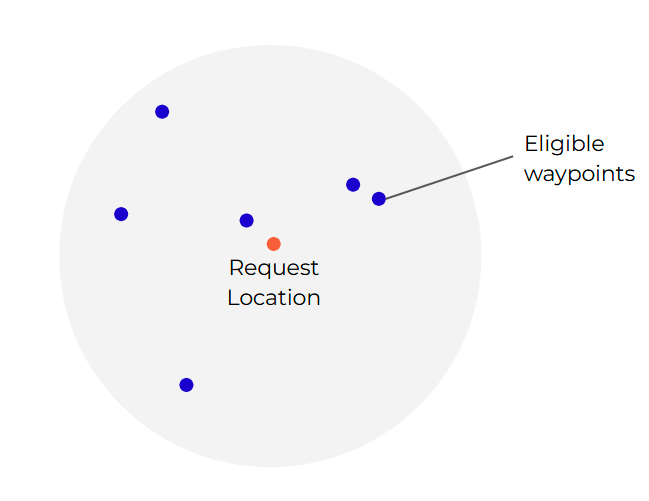
For requested pickup location A, if max walking distance is > 0, the system will finds the waypoints in the indicated transitstopset within that walking Distance range.
These waypoints will be possible pickup locations for the booking. The algorithm will decide which one is more suitable for the pickup.
Walking time or distance can be included in the cost function to show a preference for closer stops.
Example:
System configuration:
simulation.data.max_distance_to_neighbor_stops= 300simulation.data.max_number_of_neighbor_stops= 4simulation.data.calculation_parameters.node_weight_coeff= 0.5
Result:
- Find all the waypoints within 300m from the requested location
- If more than 4, only take the closest 4 waypoints
- The 4 waypoints will be the pickup nodes for the booking
- For any node selected, the overall cost function + 0.5 *
walking_time